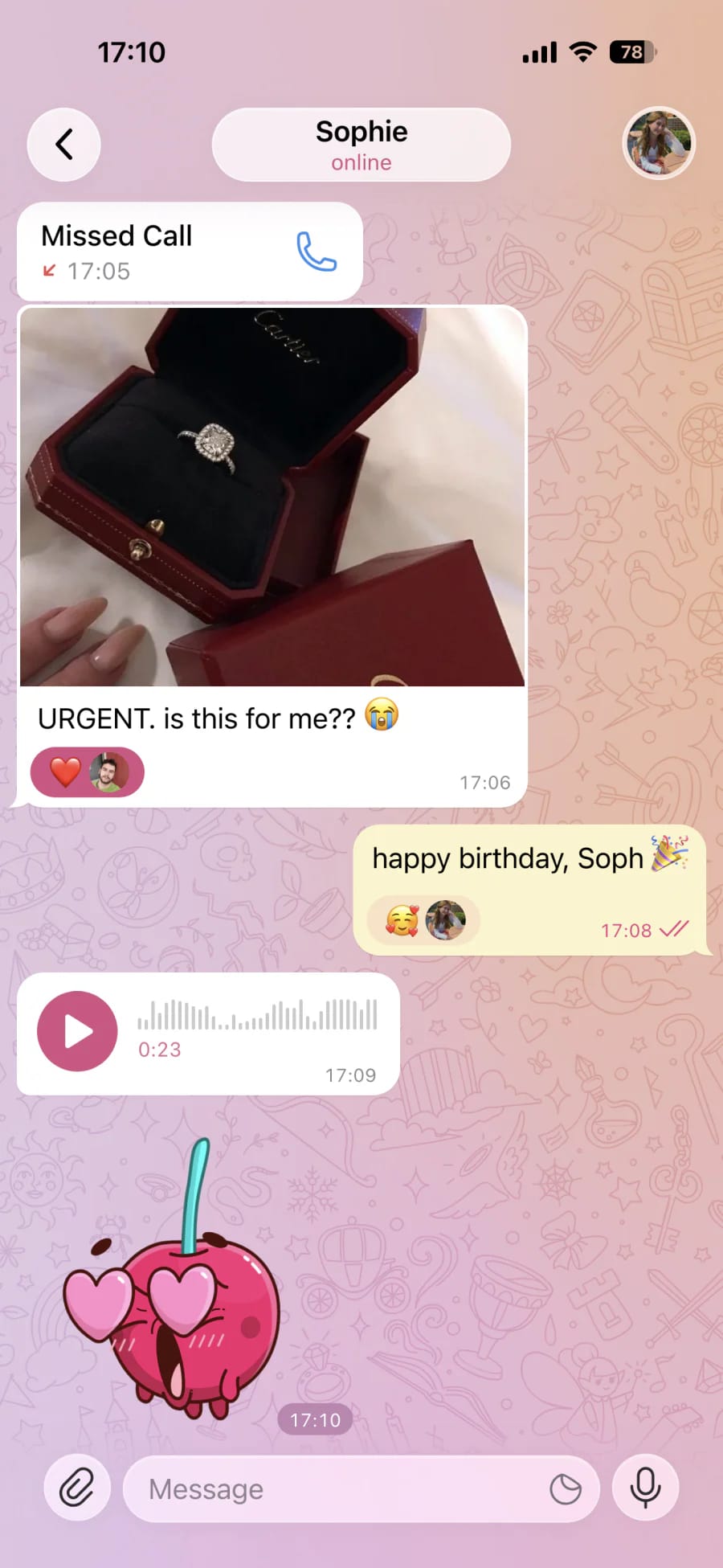
The idea always shows up out of nowhere: drop a "chat" into the group where Mike swears he'll never be late again — with the right date, timestamps and read receipts. Then comes an hour of searching: apps, websites, someone saying "just Photoshop it", and by evening the joke has gone stale. Below is everything worth knowing about a fake Telegram chat before you start — what it is, which kinds exist, the ways it's made and whether it's legal — so you can pick a method in five minutes instead.
What a fake Telegram chat is
It's a dialog built in a generator and rendered to look like real Telegram: the contact's name and avatar, a timestamp on every message, read receipts, an online status, plus the clock and battery in the status bar. People make them for pranks in friend groups, stories, TikTok and YouTube videos, memes and mockups. Fakegram draws the Telegram interface as it looks on an iPhone.
Types of fake Telegram chats: screenshots, video, round videos
- Screenshot — the classic for a group chat or a story. A long dialog won't fit on one screen, so it splits into a series: one generation gives you 10 screenshots.
- Video — the format for TikTok and Reels: an MP4 of the chat is recorded in the web generator.
- Round videos and voice messages — they bring a dialog to life; the bot turns any media file of yours into a round video.
- Gift stories — stars, Premium, NFT gifts, @send receipts: for plots like "look what I just got".
- Calls and dates — they stretch a story beyond a single evening.
Bot, browser or Photoshop: the methods compared
| Method | Time | What you need | The catch |
|---|
| Fakegram bot | About 30 seconds per screenshot | Telegram on your phone | Paid elements are marked with * |
| Web generator (beta) | Minutes, with the whole chat in view | A browser | Still in beta |
| Two of your own accounts | About 30 minutes per dialog | Two phone numbers | Message times can only be real |
| Photoshop | 40 minutes and up | Skills and Telegram's fonts | Easy to get the spacing wrong |
The bot is the main option: it runs right inside Telegram on your phone, needs no sign-up, and comes with a database of 2,000 faces and a name generator for the country you pick. If you'd rather see the whole dialog while you build it, or you need a video, open the web chat generator in your browser.
What a finished chat looks like
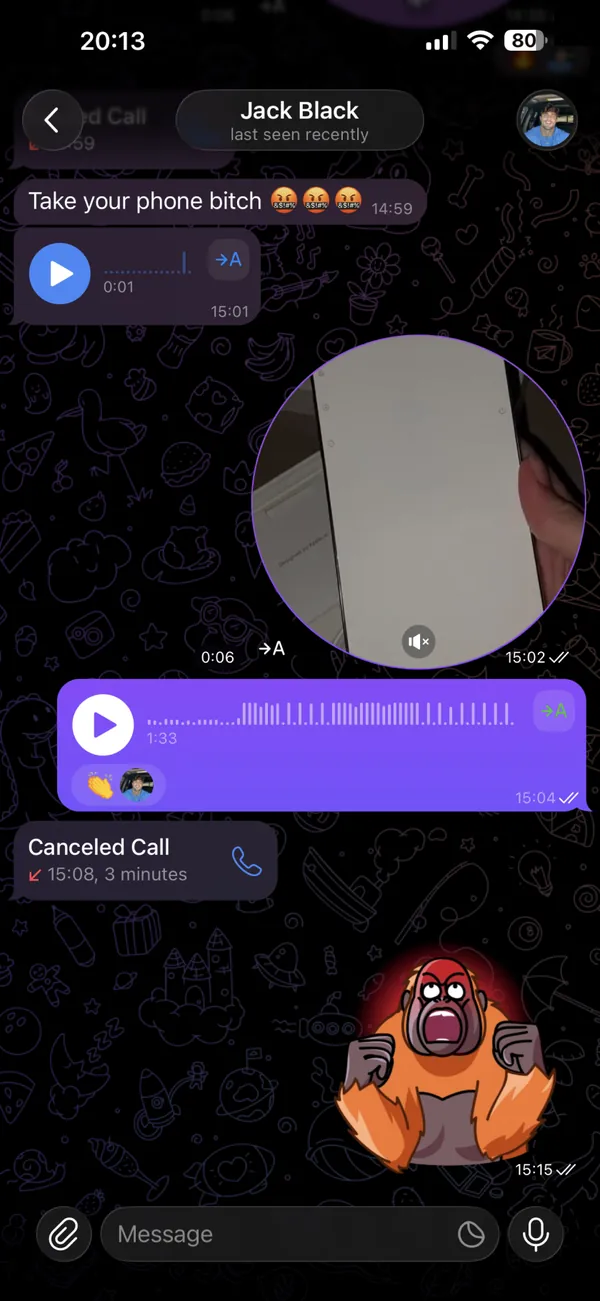
Missed and cancelled calls, voice messages, a round video, reactions and a sticker in one chat — a fake Telegram chat is more than just text.
In short: how it works in the bot
- Open @FGram_tgBot and tap "Start".
- Send the bot your lines. Set the time right in the text: "leaving now!! 5 min (19:58)". Brackets only work on text messages — for a round video or a photo, change the time with the button on the message.
- Use "Add element" to insert a date, a call, a voice message or a gift.
- Choose the contact's status and the status bar time — automatic or manual.
- Tap "Create screenshot": you'll get a preview with a watermark. Date in the wrong place? Fix it under "Message order".
- Grab your finished screenshots.
Each of these taps is unpacked in how to make a fake Telegram chat: 5 steps in the bot.
Story's ready — half a minute to go:Build your own chat in the botMake it in the browser
How much it costs
Free: 2 generations every day, 10 screenshots each, with templates and themes, date and time, round videos and blur for selected text. Elements marked with * — stars, Premium, NFT gifts, @send receipts, auto-translation, calls, reactions — unlock with tokens (one token, one generation) or on the Standard plan with no generation limits. The Ultimate AI subscription adds AI-generated dialogs and uploading a dialog as a file. You can pay in crypto (30+ networks), Telegram Stars or via CryptoBot; businesses can get an API key, with terms agreed through support. The full breakdown of what's free and where the daily limits are has its own guide; current prices are on the pricing page.
Is a fake Telegram chat legal, and is it safe?
A screenshot made for a joke or a video is just a picture, like a meme or a storyboard. Trouble starts when someone passes it off as real: defamation, blackmail, extortion and fraud built on a "chat" are punishable almost everywhere, and Fakegram's rules ban that kind of use outright — at the first signs of it, access gets shut off. And don't use a real stranger's face: that's what the face database and the name generator are for.
Jokes, content, mockups — yes; passing a fake off as a real conversation — no.
How to tell a real chat from a fake
Useful both if someone sent you "proof" and if you're the one making the joke.
- Timestamps bunched together — five replies in one minute is rare; a live chat has gaps of 1 to 15 minutes. Spread them out with (HH:MM).
- A status bar clock earlier than the last message — a screenshot taken at 19:40 with a reply at 20:04 is impossible; set the clock 1–3 minutes later.
- 100% battery at 3 a.m. — by night a real phone usually sits at 20–60%.
- Text that's too clean — zero typos across 10 replies reads like a script; add a "lol" and a missing comma.
- A single cropped screenshot — the biggest red flag for anyone checking. Ask to see the chat on their phone or to forward the message: a forwarded message shows the sender, a picture doesn't.
In-depth guides
FAQ
Can a screenshot alone prove a chat is real?
No. A convincing picture takes about 30 seconds to generate, so a screenshot on its own proves nothing either way. If it matters, ask to see the chat on the person's phone or to forward the message — a forward shows who sent it.
Is there an Android version or WhatsApp?
Not yet: only the iPhone interface and only Telegram for now. Android and WhatsApp are planned for later.
Do I need to install anything or sign up?
No. The bot runs inside the Telegram you already have, with no sign-up, and the web generator opens in a browser.
Which method should I start with?
For a screenshot or a series of them — the bot. For a video of the chat for TikTok or Reels — the web generator, which records MP4. Writing the text takes longest, so start from the ready-made dialogs in the list above.